Tips on short-cut creation to a Web app in Chrome Beta for Android
📋 Table of Contents
Table of contents will be generated automatically based on article headings.
Another week, another new release from Google so much so that things are becoming more and more easier for the users with respect to the changes. And what is the most interesting about the new release from Google is that now you have a great way to add a shortcut to a site and that too to the home screen of your device.
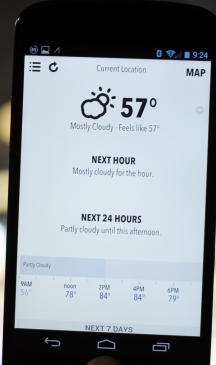
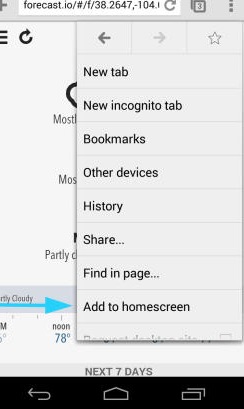
Well as a matter of fact the steps to do this very function, I must add, is pretty much easy. Once you have visited a site, the first thing that you will have to do is to go for the menu button. After this, you can see the option of Add to homescreen and now just select this option. Now once you have finished up to this step, you will have to see for yourself if an icon has been placed on your device’s homescreen or not. Now you better got to know some vital things. The first thing is that it seems like not all sites will provide you with a default icon of the site. There are some obvious advantages to this new feature.
The most important among them is that as far as the site that I used to verify, Forecast.io,
I was actually redirected to the site sans seeing the address bar or for that matter even the options that are actually inevitable components previously and in essence what this means for the average user is that now you get to use the site without the unwanted ornaments which used to be so much heavy on the user experience previously and for this very single reason, I will be recommending the beta version if you do not have much problems about going for the beta version. For others, you better wait for some more days.

joseph cyriac is a contributor at How To Guide. We are committed to providing well-researched, accurate, and valuable content to our readers.
You May Also Like


Related Articles