How to enlarge/zoom photos in Facebook

📋 Table of Contents
Table of contents will be generated automatically based on article headings.
Facebook uses small icons to display the photos of other Facebook user, which will help to decrease the loading time of page, hence it’s a great advantage for the slow net connections and mobile users. These small pictures are called thumbnails and they are too small to either strain your eyes or lose your precious time. So inorder to get better view of the image we need to visit the user profile every time.

To overcome all these problems, the simple solution is to install the FB photo zoom add-ons/ extension. You can view the actual size of the image by just covering the mouse over it. FB photo zoom is a simple to use app through which user can have the benefit of a quick and larger view of the images .The FB photo zoom app will magnify the image to its original size making the display clear and lucid.
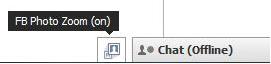
After installation, you can see a small icon beside the chat box on the right bottom corner of your Facebook. You can enable or disable it just by clicking that icon.
Google chrome users: install it from here
Firefox user: install it from here

BW is a contributor at How To Guide. We are committed to providing well-researched, accurate, and valuable content to our readers.
You May Also Like


Related Articles