How to unfollow Facebook post from the notification box
📋 Table of Contents
Table of contents will be generated automatically based on article headings.
Facebook updated its notification box with a new look, and new features can be added: and posts can be easily unfollowed.Here it is…
Unfollowing a post or comment was showed earlier .The method was little harder to follow and required where to click,and to search for what you have done.
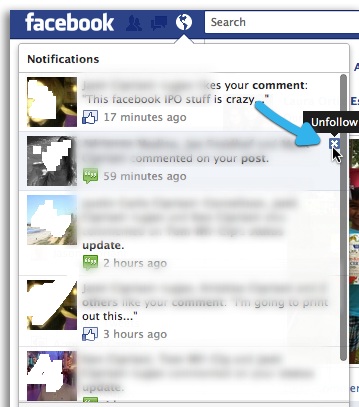
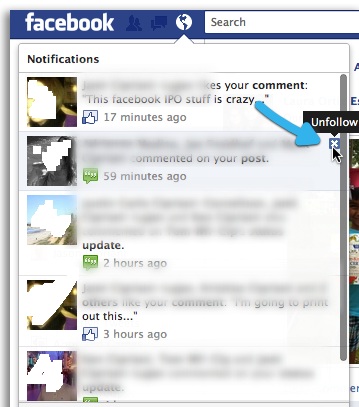
nowadays, facebook has given a renovative outlook for its notification box, and also with new features.Now ,post,can be easily unfollowed from the notification box.
As above mentioned, A small X is showed in the top right corner of each notification box. After clicking the X button on,a confirmation message will be showed know weather you want to unfollow thre post. after it is confirmed, the notification disappears, and is being replaced by an undo button(your mind changed? ). without any change of mind going forward,notifications will no longer be received, you just unsubscribe the alerts from the status update. As lifehacker says, over the course of day, this feature will roll out to everyone,including application controls in the”near future”

BW is a contributor at How To Guide. We are committed to providing well-researched, accurate, and valuable content to our readers.
You May Also Like

Related Articles