Use Android Device Manager to retrieve your lost Android device
📋 Table of Contents
Table of contents will be generated automatically based on article headings.
Here is some great news for Android users: last week,Google just made an announcement that it’s going to release the Android Device Manager,which is a new locater feature for Android.This will help users to find their phones or tablets which are lost.This should have been rolled out pretty later this month,but Google announced its launch via a Google+ posting Wednesday.
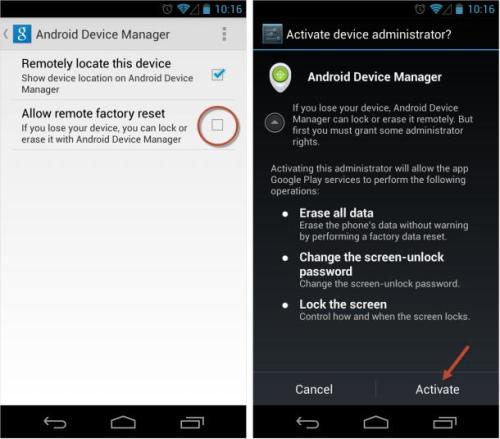
Well,this feature works similar to Lookout and Samsung’s Find My Mobile but the difference is simple-now you get it natively on your Android device.We discuss here about getting started with Android Device Manager
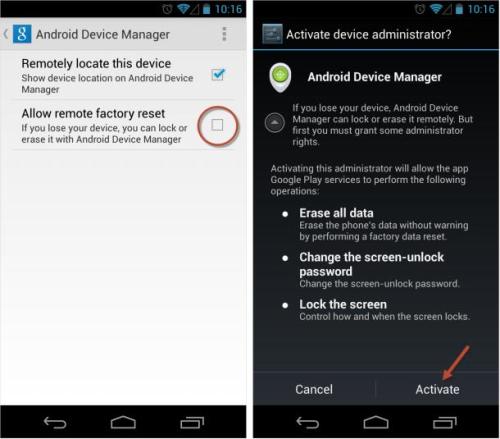
The first step is to go to the Google Settings app on your device.Next tap on the option of Android Device Manager.By default,the locater feature is activated.But to enable remote data wipe,you ought to tap on the box next to “Allow remote factory reset” and then select “Activate.”
Location-The location of the Android device will be automatically shown on the map along with the place name,the time of the last use,and when it’s located.You can always make use of zoom to get a better idea of the location.
Ring-This is a very useful feature in order to locate your device.Using this,you can ring your device for 5 minutes at the highest volume,even if the device is on silent/vibration.
Erase –You can choose the “Erase Device” option to erase all data from your device,thus protecting your personal information.But once this feature has been used,you cannot use the Android Device Manager anymore.Also,this feature need not erase the external SD memory cards.
On evaluation,the device manager could have been more effective,if it had remote locking feature which could be useful if you want to lock the device so that nobody can get your data while tracking its location.Let us hope this feature too will be added on a later stage.

joseph cyriac is a contributor at How To Guide. We are committed to providing well-researched, accurate, and valuable content to our readers.
You May Also Like
Related Articles