How To Hide Circles In Google Plus
📋 Table of Contents
Table of contents will be generated automatically based on article headings.
We can hide the circles information from our friends in Google+.
To keep your privacy secure in Google plus by hiding your circles, just follow this Google plus Privacy Settings:
- Sign In to Google Plus Account and then click on top ‘Profile’ icon.
- In Profile options go to ‘About’ page and then click on ‘Edit Profile’.
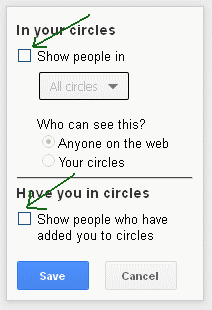
- Then uncheck both the options as shown below.
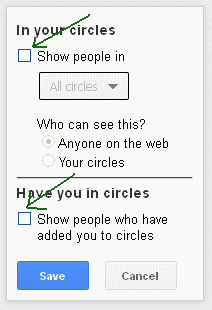
- Now your Google plus circles are hidden from other Google Plus users.
That’s it……..!. Do this as soon as possible; I already did this as I always love my privacy.

BW is a contributor at How To Guide. We are committed to providing well-researched, accurate, and valuable content to our readers.
You May Also Like


Related Articles


This Post Has One Comment
Comments are closed.
Soon after all, what a fantastic internet site and educational posts, I’ll upload inbound hyperlink – bookmark this net internet site? Regards, Reader.