How To Upload Photos In Google Plus

📋 Table of Contents
Table of contents will be generated automatically based on article headings.
How To Upload Photos or Images in Google+ has become a great requirement as Google+ is the fastest growing Social Networking site. It’s quite easy to do so in Google Plus.
Steps to follow:
- Login to Google Plus Account.
- Click on ‘Camera’ Icon as shown below.
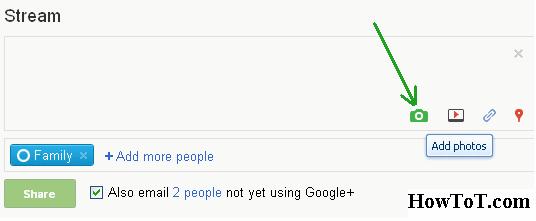
- You will see a Drop Down menu, on that click ‘Add Photos’.
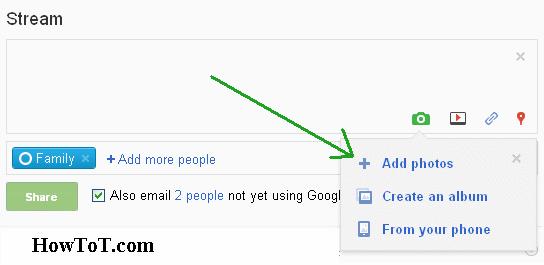
- Then just select your photos and Google+ will start uploading that image automatically.

- At last you have to click on Green ‘Share’ button.
That’s it…….!

BW is a contributor at How To Guide. We are committed to providing well-researched, accurate, and valuable content to our readers.
You May Also Like


Related Articles


This Post Has 2 Comments
Comments are closed.
Yeah but you need the intermediate step of moving them to a PC . . . not good if you have a Mac or Chromebook. What would be better is a way for Google Plus photos to directly use the Flickr photos.
Kept crashing on me … no good