Get closer to your Gmail contacts using Rapportive
📋 Table of Contents
Table of contents will be generated automatically based on article headings.
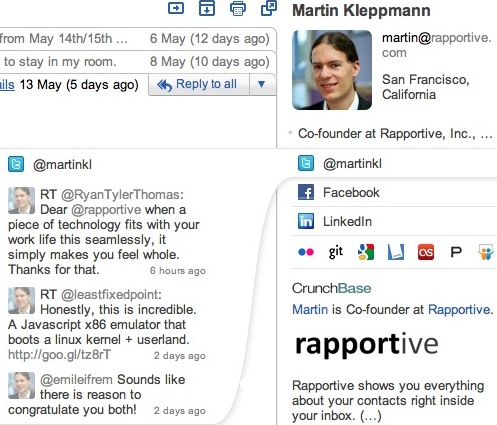
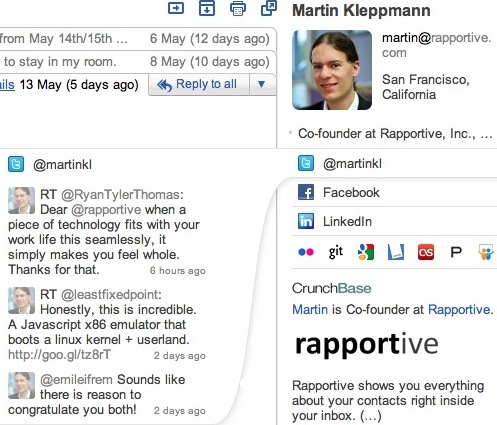
While reading a Gmail message from one of your contacts, which of the two would you like to appear in the right-hand panel: an advertisement or an interactive social media profile for your contact? No matter how targeted Gmail’s ads might be, I am sure you answered the 2nd. If so, then you’ll want to try out Rapportive, a browser extension that collects and brings the various social media profiles of your Gmail contacts right next to your inbox.
Rapportive operates with Chrome, Firefox, Safari, and Mailplane. I installed Rapportive in Chrome &, after signing out and signing back in to my Gmail account, I saw the extension operating in Gmail’s right panel. When you first see a Rapportive profile, you will see buttons to connect your LinkedIn, Facebook, and Google accounts to Rapportive extension. You need to do this only once for each one, and afterwards when you open a Gmail mail, the sender’s social media information will be displayed. Also, when you sign in to each of these accounts, Rapportive enquires you which categories of information you’d like to be included on your Rapportive profile.
With Rapportive, your Gmail inbox gets modified into an interactive wealth of information. You’ll be able to see the latest Tweets and Facebook posts from your contacts without even leaving your Gmail inbox.Using Rapportive’s Twitter box, you can follow, reply, and retweet on, and you can comment on various Facebook posts. And imagine this-you’re just a click away from opening a tab with the contact’s Facebook, Twitter, Google+, or LinkedIn profiles. My profile had various Google products — Blogger and Picasa , along with Vimeo, which is I think is included because I use my Gmail to sign in to that account.
Rapportive is not new but if Gmail is at the center of your day-to-day operations, you’ll quickly come to embrace it.

joseph cyriac is a contributor at How To Guide. We are committed to providing well-researched, accurate, and valuable content to our readers.
You May Also Like


Related Articles