Update Facebook Status via Email
📋 Table of Contents
Table of contents will be generated automatically based on article headings.
Managements often frown for using working hours for browsing through social networking sites such as Facebook. This isn’t without reason, however many of us have gone on Facebook to post a status update and find us ourselves as still on the site 45 minutes later rather than working. Here is actually a way to update your status by Just sending an e-mail, through this we can escape t from the grasp of the site during work hours.
Step 1: Sign into your account from the main Facebook page.
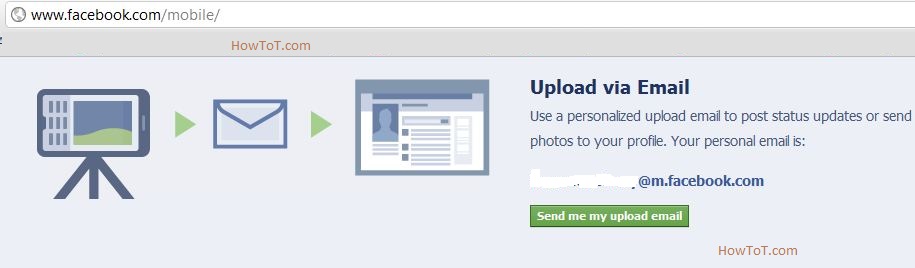
Step 2: Navigate to http://www.facebook.com/mobile in the same browser (not on your mobile device).
Step 3: Record the e-mail address displayed on this page under the heading Upload via Email.
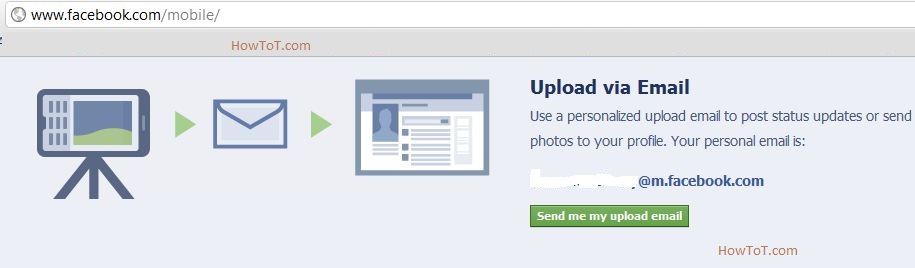
Step 4: Create a new contact in your e-mail client of choice or on your mobile device with the e-mail address from above.
Step 5: Send an e-mail to your new contact with the status update text as the subject of the e-mail and it will post to your Facebook page.
This can keep your Facebook up-to-date without having to worry about any disurbsances.

BW is a contributor at How To Guide. We are committed to providing well-researched, accurate, and valuable content to our readers.
You May Also Like
Related Articles